Fakturr
Invoicing that fits in your pocket — from adding a line item to a finished PDF with a QR payment code.
- Client
- Own product
- Year
- 2026
- Platform
- Android + Windows
- Technologies
- Flutter 3.47 · Dart · Node.js 22 · TypeScript · Express 5 · PostgreSQL · Riverpod · Drift
The brief
Tradespeople invoice from anywhere except a desk. A job wraps up on Monday afternoon at the client's, but the invoice only goes out on Thursday evening at home, because it takes a computer and a web app that is miserable to use on a phone.
The longer the delay, the later the payment. And when client details are retyped by hand, sooner or later an account number or payment reference slips — and the invoice comes back.
The other half of the problem is the opposite: nobody wants to do the month-end close, batch documents or fine-tune the invoice layout on a phone. The tool has to handle both, and above all show the same numbers in both.
The solution
Invoicing designed for the phone from the start, not a shrunk-down desktop.
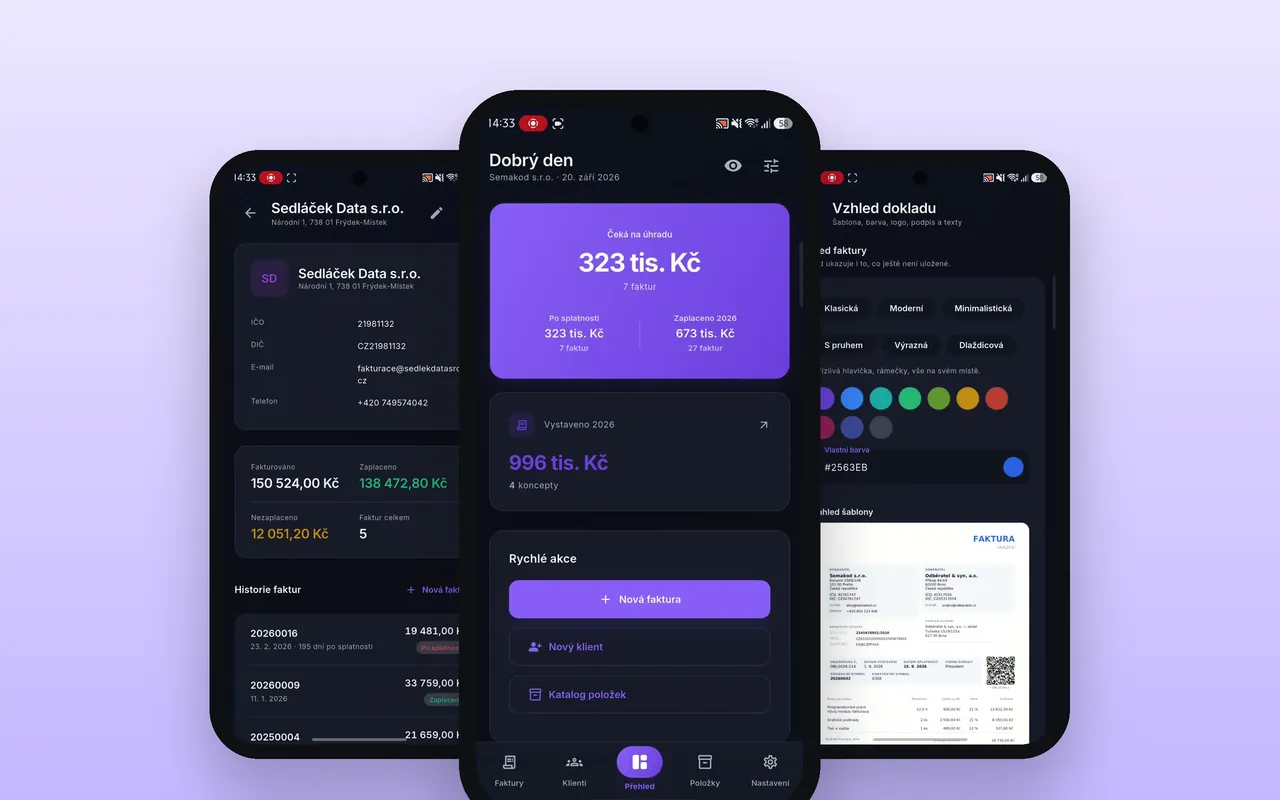
Clients and items are entered once. The catalogue holds prices, VAT rates and units (per hour, per piece, per month, per day), so issuing an invoice means picking from a list, not typing. Next to the company and VAT IDs, the client card remembers how much has been invoiced and what is still unpaid, with the full history of documents.
The VAT summary calculates itself, per rate, including base and tax. The output is a PDF in exactly the form an accountant expects — with a QR code for payment, so the customer does not have to copy anything.
The document looks like a company, not a template. There are six designs to choose from, from classic to tiled, plus a custom colour, logo, footer, corner radius and invoice texts. The preview redraws continuously, so the result is visible straight away.
The overview shows what matters — how many invoices are awaiting payment, how many are overdue and what has been paid this year, plus a monthly chart and a ranking of the best clients. One tap on the eye icon hides every amount, so the app can be opened on a tram or shown in a meeting without anyone seeing the turnover.
How it’s built
One codebase, two platforms. The app is built in Flutter — the same code produces the Android build and the Windows desktop version. A phone out in the field, a window on the second monitor in the office, the same data and the same behaviour.
Riverpod holds the state and Drift over SQLite keeps local data, so an invoice can be drafted without signal and sent as soon as there is a connection. On top sits a REST API in Node.js with Express, TypeScript and PostgreSQL; some calculations and checks live directly in the database as stored procedures, so another client cannot bypass them.
One thing deserved the most thought: VAT is calculated in two places — in Dart for the instant preview in the app, and in TypeScript on the server, where the binding version of the document is produced. Two rounding implementations are a reliable way to end up with cent-level differences between what the user sees and what is on the invoice. A shared set of test fixtures in docs/ solves it: the same inputs and expected outputs run in the tests on both sides. If one implementation drifts, the build fails, not the bookkeeping.
What I did
Design, the Flutter app, the REST API and document generation.
Outcome
The invoice leaves from the job site, not from home three days later. The item catalogue and client cards removed the manual retyping, and with it the mistakes in account numbers and payment references.
- 2
- platforms from one codebase — Android and Windows
- 6
- invoice templates with custom colours
- 1 set
- of fixtures keeps the app and the server calculating the same